
Using Quotes

BarbV

Forums Celebrity
Hi

Whenever I use the "quote" function, it replicates the entire quote, when sometimes I only want a couple of sentences.

I've tried highlighting only the sentences I want, then hitting "quote". I've also tried hitting "quote" and then deleting the sections that I don't want.

Quotes are very helpful because sometimes our threads tend to meander off the original question :smile2:
 
I've tried highlighting only the sentences I want, then hitting "quote". I've also tried hitting "quote" and then deleting the sections that I don't want.

Hi Barb,

When you want to quote a person, click on "quote" button within the person's post.

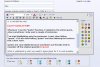
A new "reply to thread" screen comes up with the person's quote already in it. It will look like this: (See attached image)

What is in red in the picture is what you need to leave alone for it to work properly. It is html code. The software will initially take the entire post, but you can trim down to what you want within that. Everyone's quote begins & ends with something similar.

Hope this helps!
 

Attachments

  • quote.jpg
    quote.jpg
    68.7 KB · Views: 17
Hi Barb,


What is in red in the picture is what you need to leave alone for it to work properly. It is html code. The software will initially take the entire post, but you can trim down to what you want within that. Everyone's quote begins & ends with something similar.

Hope this helps!

OK - It seems to be working fine now. I don't see any "red" but at least I seem to be able to delete the sentences that don't apply - funny - I'm sure I did exactly the same thing...:o
 
The text wont actually be in red when you use it. I just highlighted it in my screen shot so it would stand out in my explanation. :biggrin2:
 
Back
Top