

Kelly
Administrator
Ignoring a Member:
Did you know you can hide members posts if you would rather not read anything posted by them? Here is how to do it:
To add a user to your ignore list, go to your User CP and in the left Nav Panel under Miscellaneous, select [Buddy / Ignore Lists], type the username you wish to ignore in the Ignore List blank and click [Update Ignore List]
Posts from users that you are ignoring are now hidden from view when logged into the forums.
(One caveat: if someone NOT on your ignore list quotes a person ON your ignore list, the quoted text from the ignored person will be visible to you.)
Reporting a Post:
While the moderators do their best to stop problems before they get out of control, all members can help by being part of the forums "neighborhood watch" system.
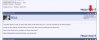
If you spot a post that violates the forum rules, you can report it by clicking on the white & red triangle icon that appears on the right side of every post. This will generate a message to the moderators.
I’ve attached a screen shot below so you can see where the icon sits.
Did you know you can hide members posts if you would rather not read anything posted by them? Here is how to do it:
To add a user to your ignore list, go to your User CP and in the left Nav Panel under Miscellaneous, select [Buddy / Ignore Lists], type the username you wish to ignore in the Ignore List blank and click [Update Ignore List]
Posts from users that you are ignoring are now hidden from view when logged into the forums.
(One caveat: if someone NOT on your ignore list quotes a person ON your ignore list, the quoted text from the ignored person will be visible to you.)
Reporting a Post:
While the moderators do their best to stop problems before they get out of control, all members can help by being part of the forums "neighborhood watch" system.
If you spot a post that violates the forum rules, you can report it by clicking on the white & red triangle icon that appears on the right side of every post. This will generate a message to the moderators.
I’ve attached a screen shot below so you can see where the icon sits.