New posts - one way or the other

Old setting/new setting?

  • I liked the old setting. Please change it back.

    Votes: 20 47.6%
  • I like the current setting. Please keep it.

    Votes: 22 52.4%

  • Total voters
    42
  • Poll closed .
I'm stumped. I only have to open any last page of any thread from the "new posts" link. Once I do the whole thread will go away. This is not happening for you all?

no sadly its not working that way...I think since the change its happened once a few days ago to one thread..since than everything stays unread...no matter how many posts I read though in the section..
The only way to correct it is to mark them all and hope the planets are aligning and noone is posting while I mark them read or I miss the post...
 
Tutorial time!

OK, I'll try this one more time.

With as little as 3 clicks per thread, you can catch up on the latest.

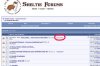
Picture #1. The forum homepage. Click "New Posts"
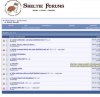
Picture #2 Click on "last page" (or #1, #2, etc depending upon how many pages the thread has.)
Picture #3 The last page of the thread. Read whats new then click "New Posts"
Picture #4 Well, lookie there! The thread has disappeared from the "New Posts" page!

Remember: You must click "New Posts" from the last page of the thread for it to disappear.

Now, if you click on, say page 2 of 3 & then click "New Posts" the thread will remain.

If you click page 2 & then read on directly to page 3 (last page) & then click "New Posts" the thread is removed.

Is it working? Have I convinced you how easy it is? :wink2:
 

Attachments

  • tut1.jpg
    tut1.jpg
    30.4 KB · Views: 10
  • tut2.jpg
    tut2.jpg
    36.1 KB · Views: 13
  • tut3.jpg
    tut3.jpg
    48.2 KB · Views: 13
  • tut4.jpg
    tut4.jpg
    49.2 KB · Views: 7
ok one problem Im having with that is step #2....there are several threads that are unread and have several pages to them, and I cant remember exactly what page I stopped reading at...since it may be a few hours since I checked it there could be 2 new pages from the last post I read...If I hit last page I have to than try to figure out what page I left off reading on and where the new unread posts start....
 
OK, I'll try this one more time.

With as little as 3 clicks per thread, you can catch up on the latest.

Picture #1. The forum homepage. Click "New Posts"
Picture #2 Click on "last page" (or #1, #2, etc depending upon how many pages the thread has.)
Picture #3 The last page of the thread. Read whats new then click "New Posts"
Picture #4 Well, lookie there! The thread has disappeared from the "New Posts" page!

Now, if you click on, say page 2 of 3 & then click "New Posts" the thread will remain.

If you click page 2 & then read on directly to page 3 (last page) & then click "New Posts" the thread is removed.

Is it working? Have I convinced you how easy it is? :wink2:

Thats how i view the threads. The new posts tab makes viewing so much easier. The only time i got to specific topics is to post a new thread or revive an old one.
 
ok one problem Im having with that is step #2....there are several threads that are unread and have several pages to them, and I cant remember exactly what page I stopped reading at...since it may be a few hours since I checked it there could be 2 new pages from the last post I read...If I hit last page I have to than try to figure out what page I left off reading on and where the new unread posts start....

And how is this different from the old way?

I would just click last page and then go back until you find your original place.
 
And how is this different from the old way?

I would just click last page and then go back until you find your original place.

VIA the old way I would just have to click on the thread and it would bring me to the page I left off on....SO YEAHHH that way was MUCH easier and LESS time Consuming....
 
Back
Top